Introduction
Automation testing is vital for ensuring efficient and reliable software development processes. By utilizing automation tools, companies can streamline testing procedures and accelerate product delivery. Let's delve into essential metrics that gauge the effectiveness and efficiency of automation testing.
Efficiency Metrics
Test Execution Time:
Measure the time taken for automated test case execution compared to manual testing.
Test Coverage:
Assess the percentage of code covered by automated tests to ensure comprehensive testing.
Resource Utilization:
Evaluate the optimal utilization of testing resources, including hardware, software, and human capital. Tracking these efficiency metrics enables organizations to optimize their automation testing practices and enhance overall software development efficiency.
Tracking these efficiency metrics enables organizations to optimize their automation testing practices and enhance overall software development efficiency.
Test Execution Time:
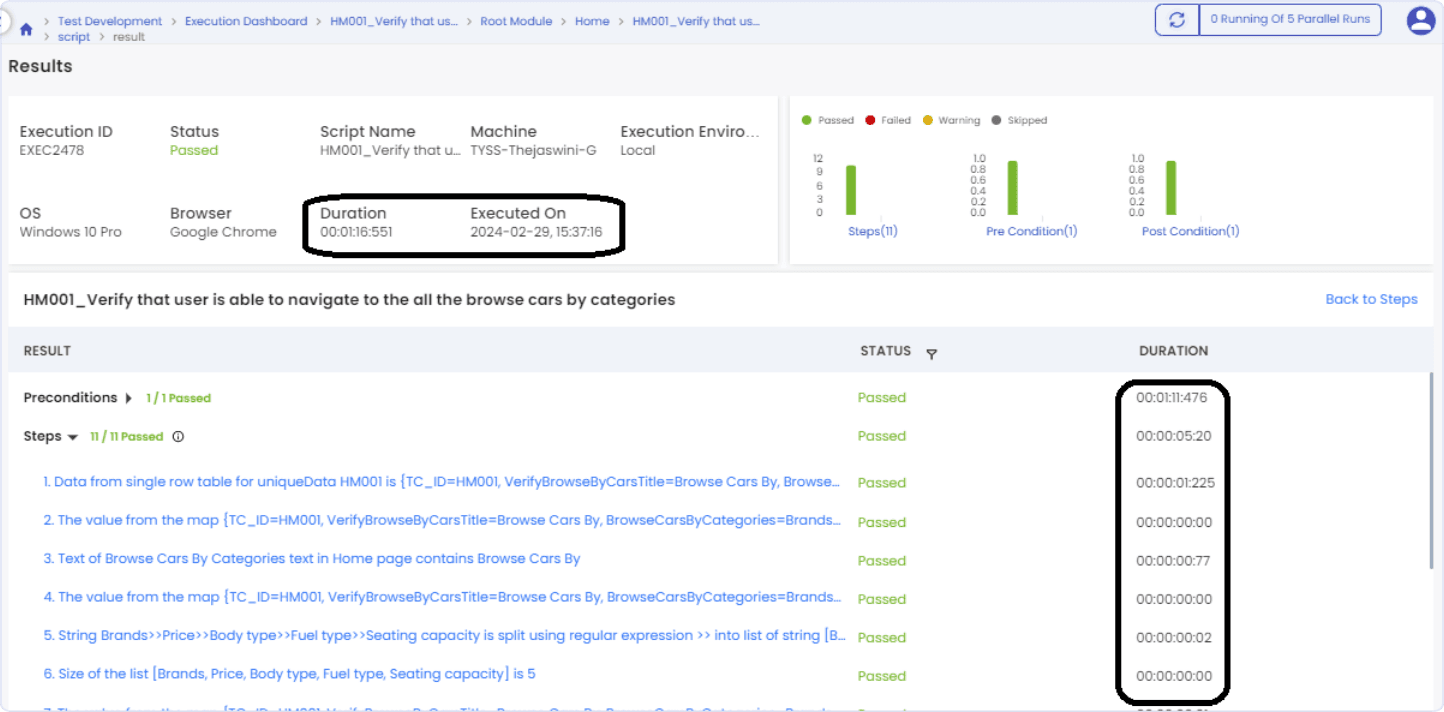
Efficient execution of automated test suites is crucial for successful software testing. In FireFlink, we diligently monitor the time required to execute automation scripts, which refers to the duration needed for a test case or script to complete a specific set of instructions. Unlike manual testing, where each test case is conducted individually, automation condenses these activities into test scripts. FireFlink's support for parallel execution across multiple environments or devices is a significant advantage, reducing test execution time, particularly for extensive test suites. With automation, the time taken for execution is significantly lower compared to manual execution, resulting in improved efficiency.
- Execution time refers to the duration needed for a test case or script to complete specific instructions.
- In manual testing, each test case is conducted individually, while automation consolidates activities into test scripts.
- Test scripts automate necessary activities or procedures, distinguishing them from manual test cases.
- FireFlink’s Parallel execution across various environments or devices reduces test execution time, especially for large test suites.
- Efficiency Enhancement: Automation typically requires less time for execution compared to manual testing, boosting overall testing efficiency.
Test Coverage
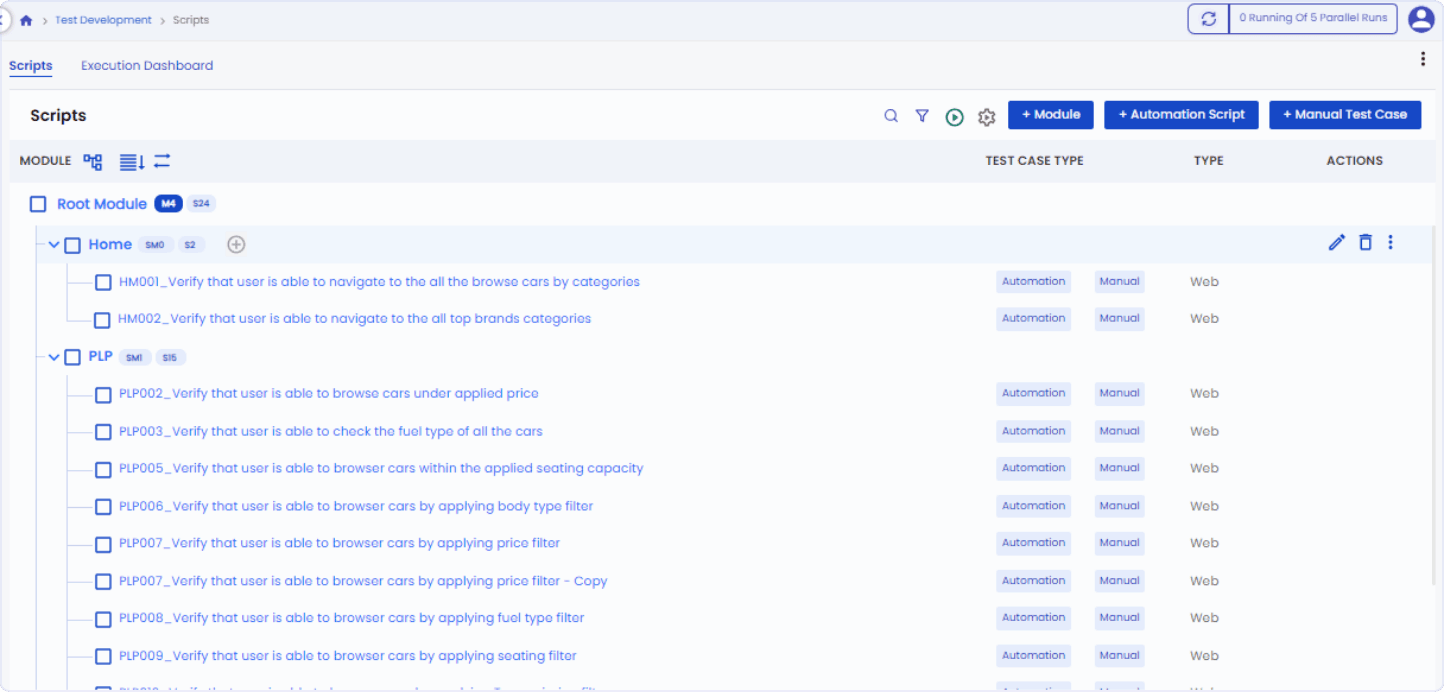
Test Coverage is a critical metric that measures the extent to which code or functionalities are covered by automated tests, ensuring comprehensive testing and minimizing risks. It involves examining the test scripts and determining the percentage covered. The FireFlink platform facilitates rapid scripting of test cases, allowing manual test engineers to write test scripts efficiently. This capability enables comprehensive coverage of the entire application, enhancing overall testing effectiveness.
- Test Coverage assesses the proportion of code or functionalities covered by automated tests.
- Comprehensive coverage ensures thorough testing and reduces the likelihood of undetected issues.
- The platform enables manual test engineers to write test scripts quickly, ensuring comprehensive coverage of the application.
- Higher test coverage reduces the risk of bugs slipping into production, enhancing software reliability.
- Rapid scripting of test cases improves testing efficiency and accelerates the testing process.
Resource Utilization
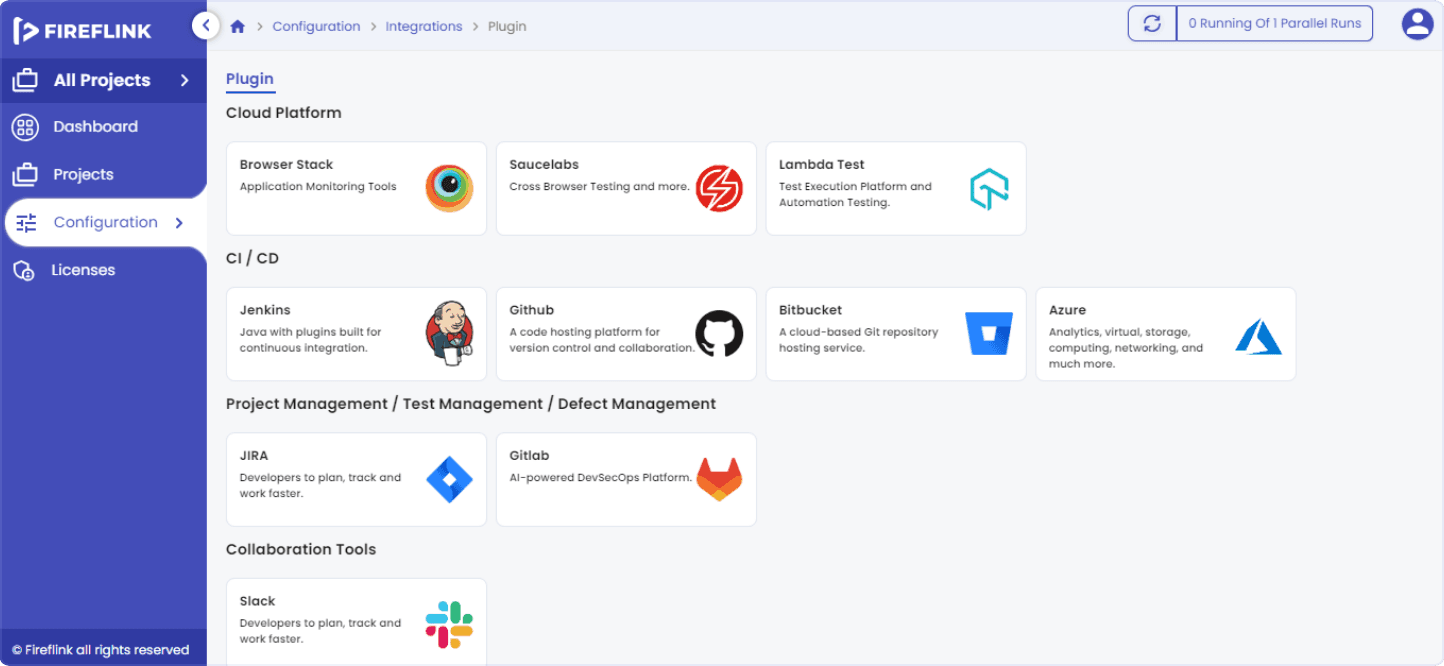
Resource Utilization involves evaluating the hardware infrastructure to ensure it efficiently meets testing requirements. This includes assessing factors like processing power, memory, storage capacity, and network capabilities. FireFlink seamlessly integrates with CI/CD pipelines, enabling automated triggering of tests with each code modification. This ensures prompt issue identification and streamlines the development workflow.
- Assessing hardware infrastructure to ensure it aligns with testing needs, considering factors like processing power and storage capacity.
- FireFlink's CI/CD pipeline automates test triggering upon code modifications, facilitating timely issue detection and a smoother development process.
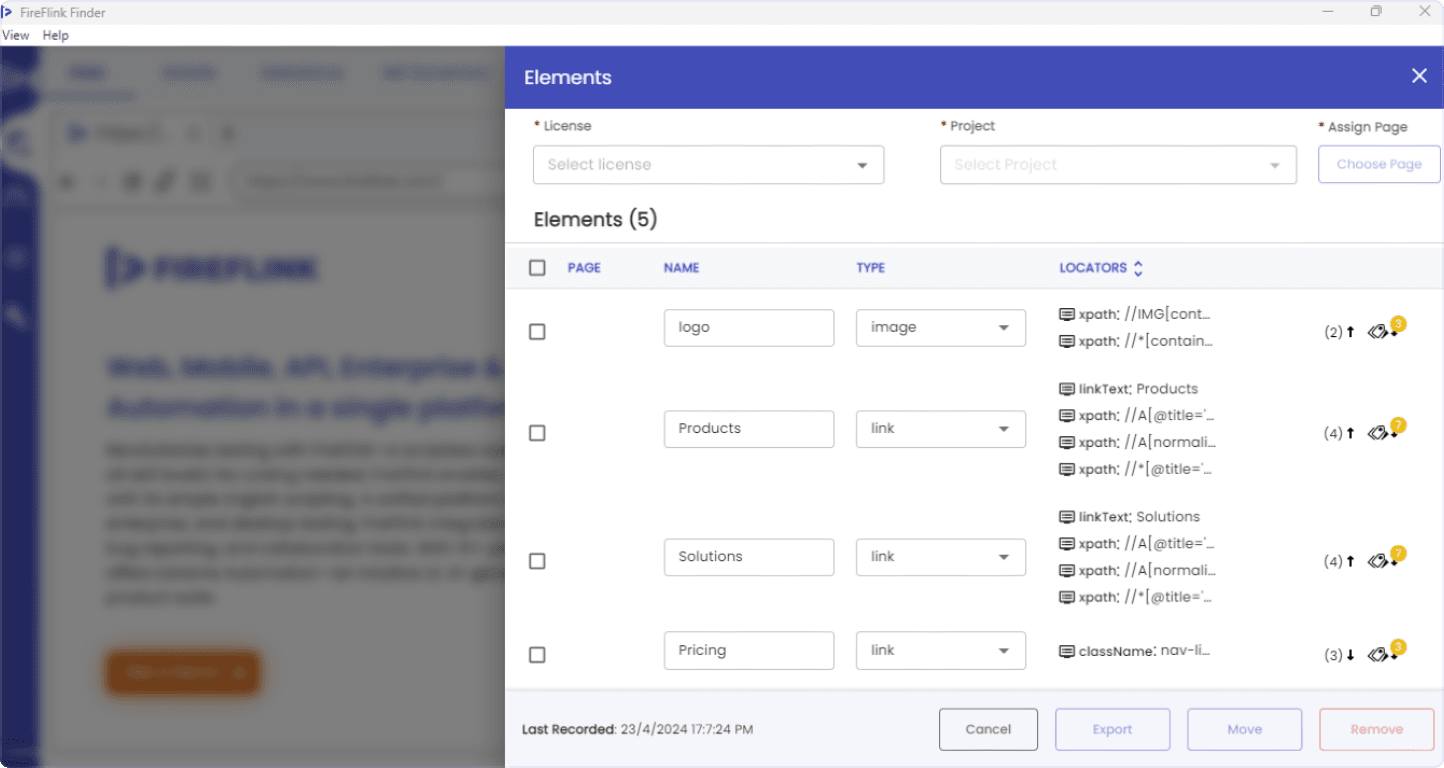
- FireFlink Finder’s feature allows test engineers to efficiently locate various elements, saving time by providing multiple locators for a single element.
- By leveraging FireFlink's features, test engineers can streamline their workflows and reduce manual effort in element location, enhancing overall testing efficiency.
Effectiveness Metrics:
Defect Detection Rate: Measure the effectiveness of automated tests in identifying defects and issues early in the development cycle, reducing debugging efforts later.
Test Case Success Rate: Assess the success rate of automated test cases in accurately validating desired functionalities and scenarios, ensuring reliable test results.
Regression Test Effectiveness: Determine the effectiveness of automated regression tests in preventing the reintroduction of previously fixed bugs and maintaining software stability over time.
These effectiveness metrics provide valuable insights into the performance and impact of automation testing on software quality and reliability.
Defect Detection Rate:
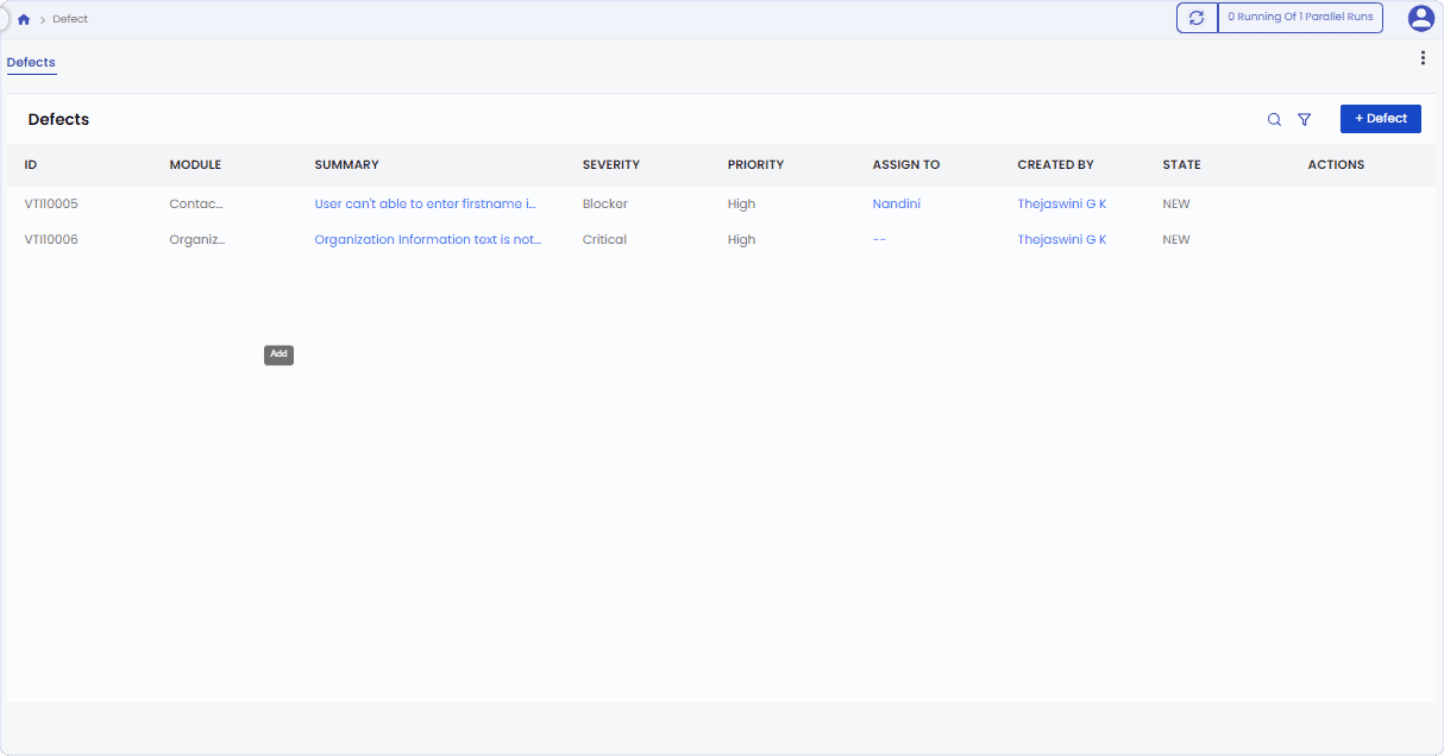
Efficient defect detection is crucial for ensuring software reliability. FireFlink simplifies this process with its customizable defect template and inbuilt tracking tool, enhancing the overall defect detection rate. Here's how FireFlink contributes to improving defect detection:
- Customizable Defect Template: Allows for easy analysis of defects when a test case fails.
- Tagging Option: Enables efficient categorization and prioritization of defects for streamlined defect management.
- Inbuilt Defect Tracking Tool: Eliminates the need for additional defect tracking tools, saving time and resources.
- With these features, FireFlink enhances the defect detection rate, ensuring robust software quality and reliability.
Test Case Success Rate
The test case success rate measures the percentage of automated test cases that pass successfully, reflecting the reliability of the testing framework and the effectiveness of test scripts. FireFlink simplifies this process with its user-friendly interface and comprehensive reporting features. Here's how FireFlink contributes to improving the test case success rate:
Effortless Automation Suite Generation:
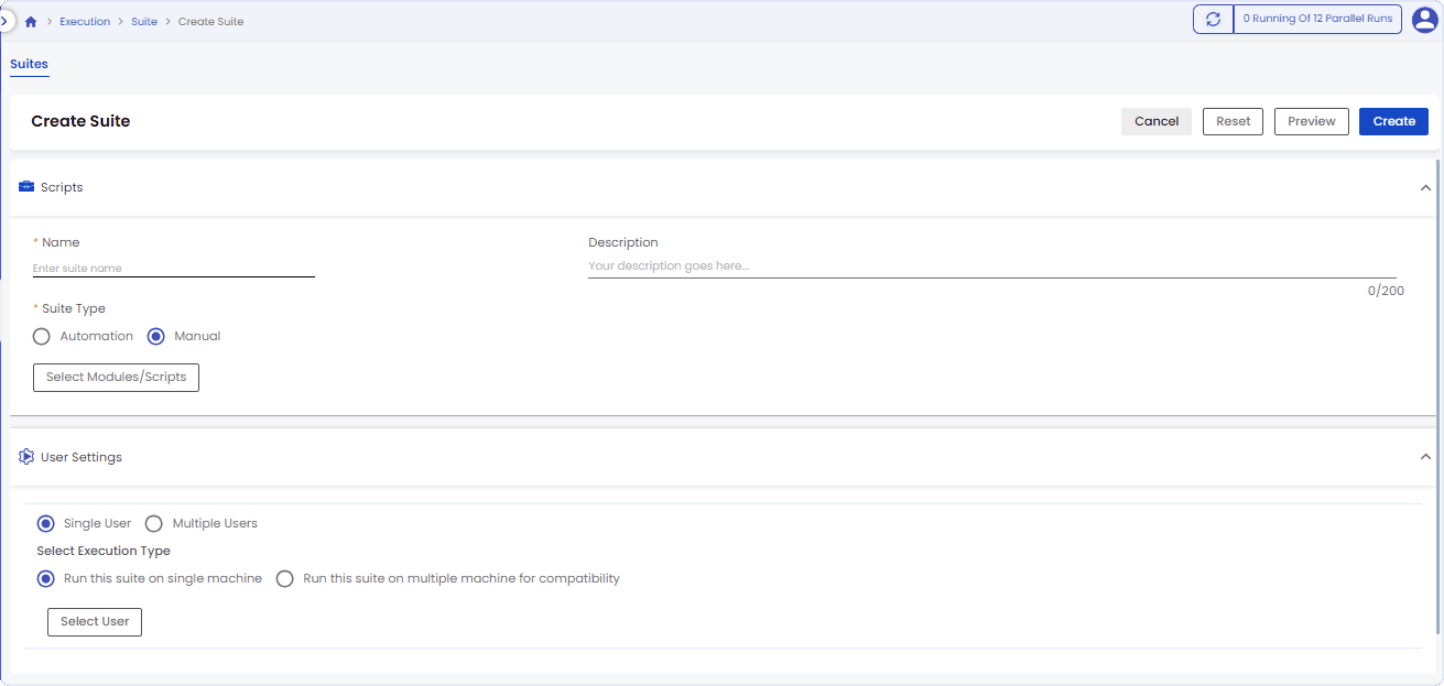
FireFlink makes it easy to generate automation suites, streamlining the test case creation process.
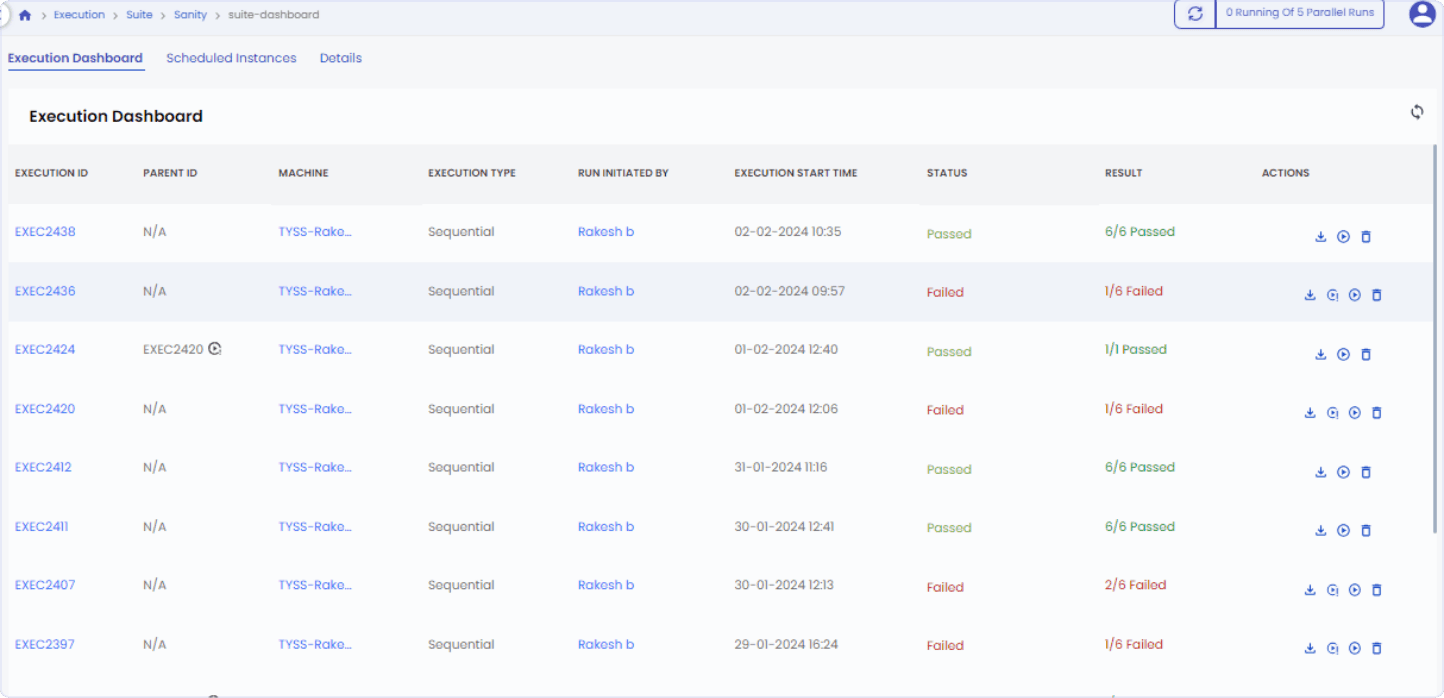
Comprehensive Test Execution Reporting: After executing the suite, FireFlink provides detailed reports on the number of test cases included, as well as the number of test cases that passed or failed.
Detailed Failure Analysis:
FireFlink enables easy identification of the exact step at which a script or suite failed, reducing the time required for analysis and troubleshooting. With these features, FireFlink enhances the success rate of test cases, ensuring the reliability and effectiveness of the testing framework.
Suite Creation:
Detailed View of Suite Results:
Regression Test Effectiveness:
Regression test effectiveness evaluates the capability of automated tests to identify regressions, ensuring software stability and mitigating risks associated with new releases. FireFlink simplifies regression testing with its suite creation and scheduling features, enhancing overall testing efficiency. Here's how FireFlink contributes to improving regression test effectiveness:
Regression Suite Creation:
FireFlink allows easy creation of regression suites, facilitating the organization and execution of regression tests. Automated Regression Execution: With FireFlink, failed test cases can be automatically rerun as part of the regression suite, streamlining the regression testing process.
Scheduled Regression Execution:
FireFlink offers the option to schedule the execution of regression suites, reducing manual intervention and ensuring timely regression testing. These features empower test engineers to efficiently detect regressions and maintain software stability, thereby enhancing the effectiveness of regression testing in FireFlink.
Scheduler:
 Reporting Techniques
Reporting techniques are essential for optimizing automation, offering valuable insights into test execution, issue identification, progress tracking, and decision-making facilitation. These techniques are instrumental in ensuring the effectiveness and efficiency of automation testing processes.
Reporting Techniques
Reporting techniques are essential for optimizing automation, offering valuable insights into test execution, issue identification, progress tracking, and decision-making facilitation. These techniques are instrumental in ensuring the effectiveness and efficiency of automation testing processes.
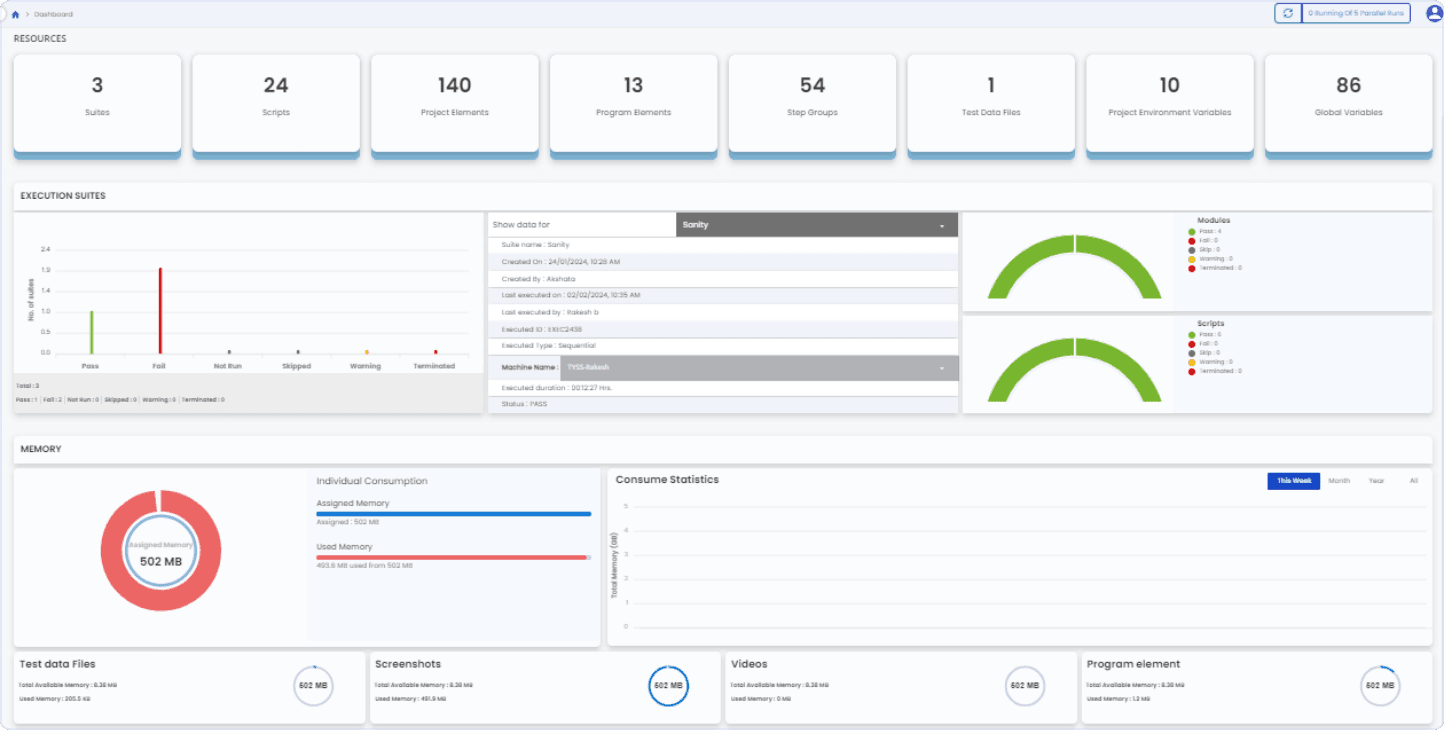
Customized Dashboards
Customized dashboards are instrumental in providing stakeholders with real-time insights into testing performance. In FireFlink, we offer customizable dashboards that present graphical representations of various critical factors, including:
- Resource utilization
- Memory allocation
- Memory consumption statistics
- Machine details
- Counts of scripts, suites, and the total number of users in the project.
These dashboards provide a comprehensive graphical overview of the project's details, enabling stakeholders to make informed decisions and track testing progress effectively.
Trend Analysis
Analyzing historical data allows for the identification of patterns and trends in testing metrics, facilitating proactive decision-making and continuous improvement efforts. In FireFlink, the "Analytics" section offers an engaging and insightful platform for conducting in-depth analysis of test outcomes. Here's how it works:
- Flexible Timeframes: Users can analyze test outcomes within customizable timeframes, ranging from the past 7 days to the previous 12 months, using FireFlink's intuitive UI.
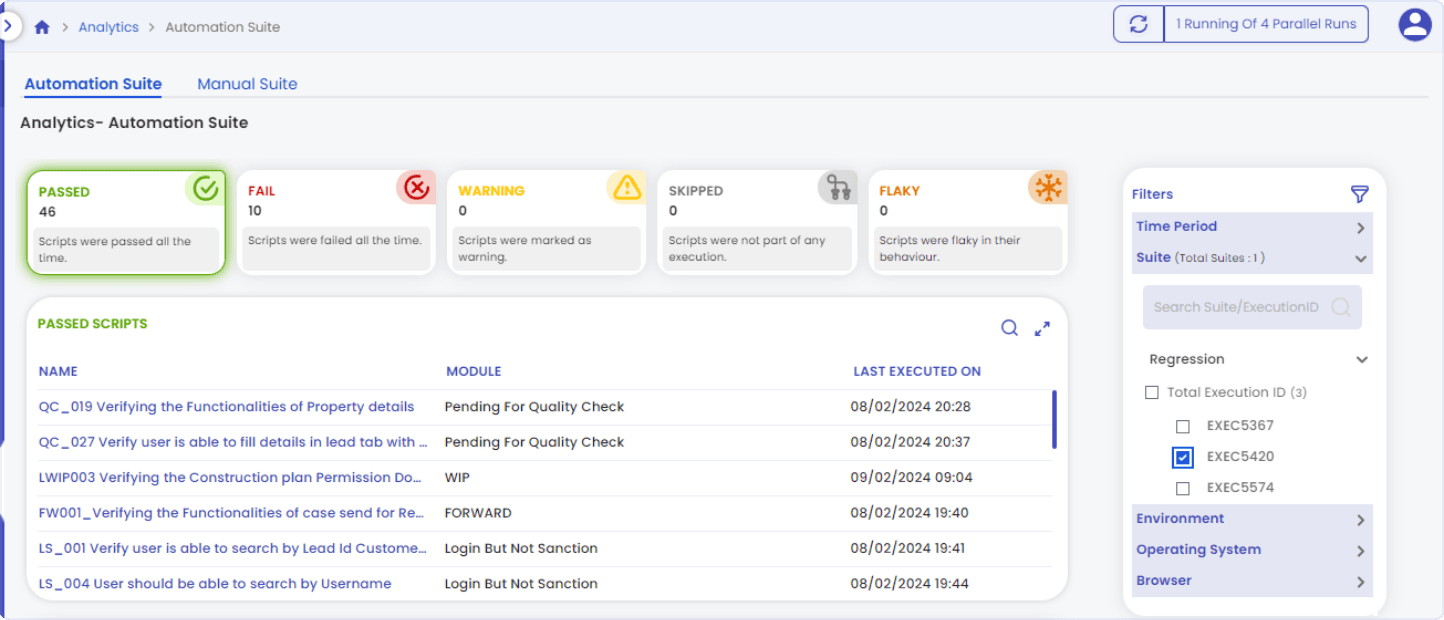
- Comprehensive Analysis: The analysis includes components such as "Passed," "Failed," "Warning," "Skipped," and "Flaky," enabling users to easily identify test scripts categorized by color.
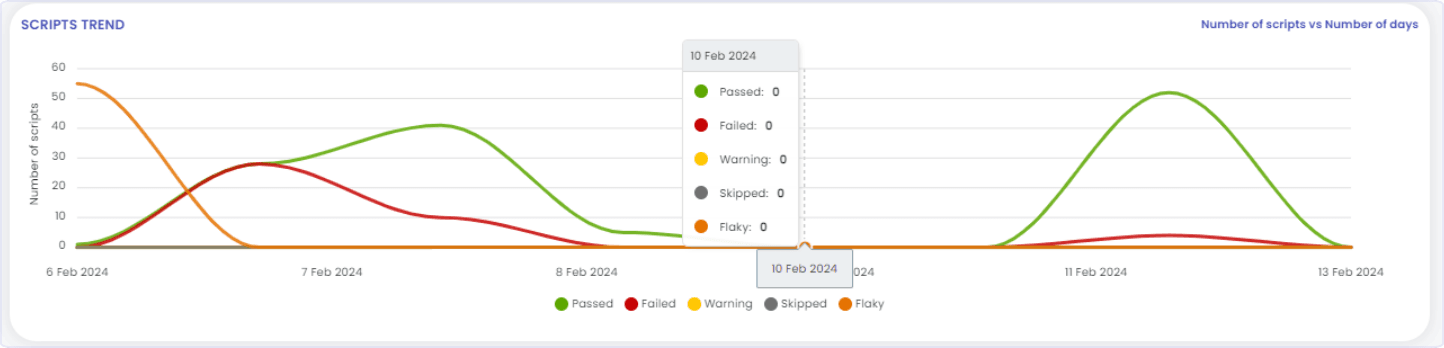
- Graphical Representations: FireFlink provides graphical representations of test script performance over time, allowing developers, QAs, Business Analysts, and other team members to pinpoint stable builds based on customized dates.
- By leveraging FireFlink's trend analysis capabilities, stakeholders can gain valuable insights into testing performance and make informed decisions to drive continuous improvement.
Automated Report Generation:
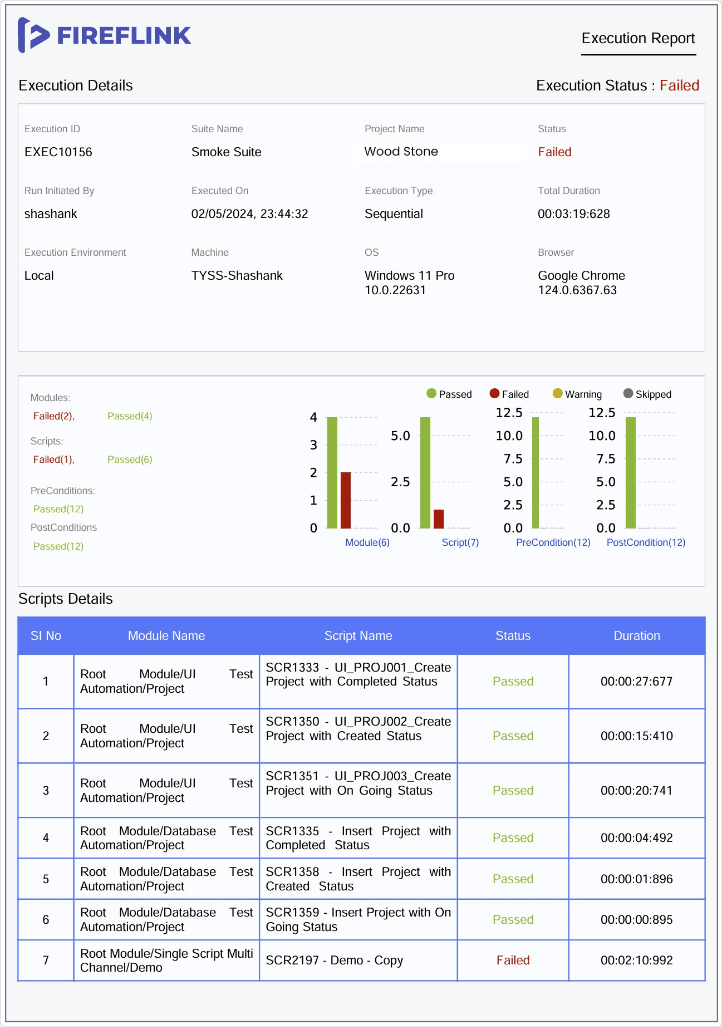
Implementing automated reporting mechanisms streamlines the dissemination of test results, fostering transparency and collaboration. In FireFlink, this is achieved through the automated generation of Suite reports, offering the following benefits:
- Customization: Suite reports can be tailored according to preferences, ensuring relevance and clarity.
- Convenience: Reports are conveniently received via email, allowing stakeholders to access critical information effortlessly.
By automating report generation in FireFlink, transparency and collaboration are enhanced, enabling efficient decision-making and driving overall testing effectiveness.
Conclusion
In summary, automation testing is crucial for efficient and reliable software development. By using automation tools, companies can speed up product delivery while keeping quality high. Key metrics like test execution time, coverage, and resource use help measure how well automation testing works. Also, reports like dashboards and trend analysis give useful insights into testing and help improve it over time. With the right approach to automation testing and good reporting, companies can make their testing better, improve software quality, and work more efficiently.
- Automation testing is important for fast and reliable software development.
- Metrics like test time and coverage show how well automation testing works.
- Reports like dashboards and trend analysis help understand testing and make it better.
- With good automation testing and reporting, companies can improve software quality and work more efficiently.